
The interface
One window, five workspaces. Every workspace shows the same project — it only rearranges the panels for the job at hand.
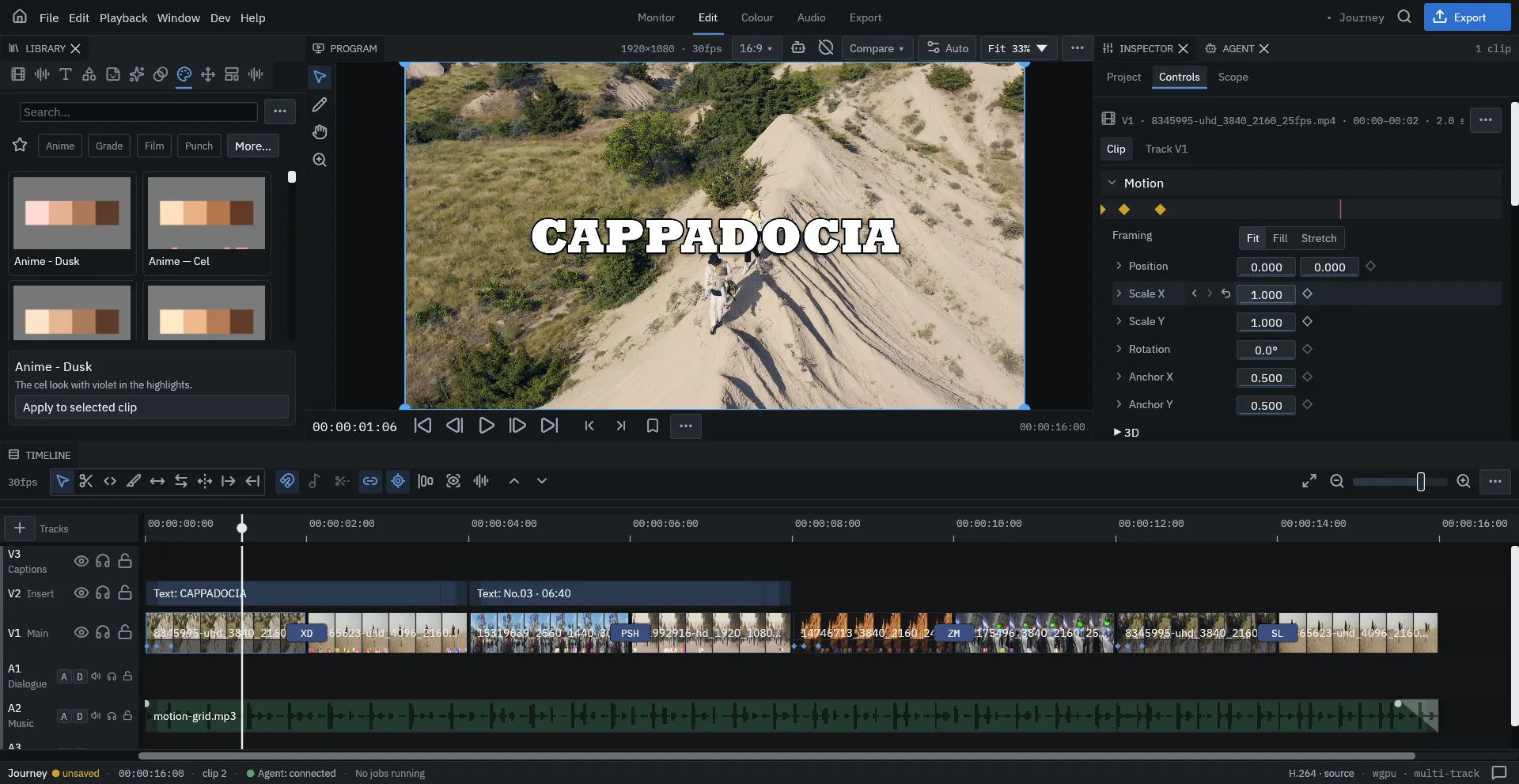
Workspaces
Switch workspaces with the tabs at the top of the window.
| Workspace | For |
|---|---|
| Monitor | Watching the cut full size. |
| Edit | Assembling and trimming — Library, viewer, Inspector and timeline. |
| Colour | Grading with looks, colour wheels and scopes. |
| Audio | Levels and the mixer, with the master limiter and loudness target. |
| Export | Delivery and background jobs. |
Panels are tabs you can drag, split and close; Window brings back any panel you closed. Your layout is remembered per workspace.
Panels
Library
Media, audio, text, effects, transitions, looks, elements and presets, each in its own tab. Drag a card onto the timeline, onto a clip, or onto a cut between two clips. Organise media in bins and search across everything.
Program viewer
Plays the timeline as it will export. Select a clip to move, scale and rotate it directly on the viewer; text and shapes get their own handles. The toolbar shows the sequence size and frame rate, the aspect ratio, a Compare mode and the zoom.
Inspector
Every parameter of what you selected. The tabs change with the selection:
- Project — name, frame (landscape or portrait), aspect ratio, resolution, frame rate, master limiter and loudness target.
- Controls — motion, framing (Fit, Fill, Stretch), opacity, blend mode, masks, time remap, audio, tracking and every effect on the clip. The diamond next to a value adds a keyframe.
- Text — content, font, size, colour, stroke, gradient, glow, animation and presets, for a text clip.
- Lyrics — style and line controls, for a lyric scene.
- Scope — histogram, waveform and vectorscope.
Agent panel
Where you write requests for your AI agent and review what it did. See Work with an AI agent.
Timeline
Video tracks stack upward (V1 is the main track, higher tracks sit on top); audio tracks sit below. Each track header has visibility, audio and lock buttons. The toolbar above holds the editing tools, snapping, linked selection and the zoom slider.
Status bar
The bottom line shows the project and whether it is saved, the duration, the selection, the agent connection, running jobs, the source codec and the render path.